[hardhat] hardhat 세팅해보기
Truffle Framework 를 활용하여 스마트 컨트랙트 예제를 연습하려 했으나. 무슨 이유에서인지 가나슈를 활용해 배포 시 아래와 같은 에러가 발생하였습니다.
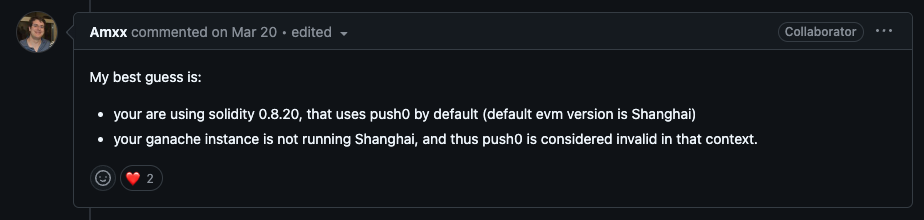
서칭을 좀 해보니 Amxx 씨가 아래와 같은 원인같다고 답변을 단 글을 발견하였습니다.
- Solidity 0.8.20 버전은 기본적으로 Shanghai EVM 버전에서 도입된 PUSH0 명령어를 사용
- Ganache가 Shanghai 버전을 지원하지 않는 경우, 이를 유효하지 않은 명령어(opcode)로 간주해 배포 실패
이번 기회에 최신 EVM 및 Solidity 버전과의 호환성이 뛰어난 Hardhat을 활용해 스마트 컨트랙트 예제를 연습하기로 결정하였고 해당 내용에 대해서 정리한 글입니다.
hardhat 이란?
Hardhat은 이더리움 스마트 컨트랙트 개발, 테스트, 배포를 위한 Javascript 기반 개발 환경입니다. 아래와 같은 특징을 가집니다.
- 주요 특징
- Hardhat은 Hardhat Runner를 통해 컴파일, 테스트, 배포, 네트워크 실행 등 다양한 작업을 간편하게 수행할 수 있습니다.
- Ex.
npm hardhat compile,npx hardhat test
- Ex.
- 플러그인과 커스터마이징을 통해 기능을 확장할 수 있어 높은 유연성을 제공합니다.
- 로컬 테스트를 위한 노트 실행 가능
npx hardhat node명령어를 통해 가벼운 로컬 블록체인을 구성하여 개발할 수 있습니다.
- Hardhat은 Hardhat Runner를 통해 컴파일, 테스트, 배포, 네트워크 실행 등 다양한 작업을 간편하게 수행할 수 있습니다.
개발환경 구성
- Solidity: 0.8.27
- Npm 7 이상
- JavaScript
프로젝트 생성
1
npm init -y
- hardhat 실행
1
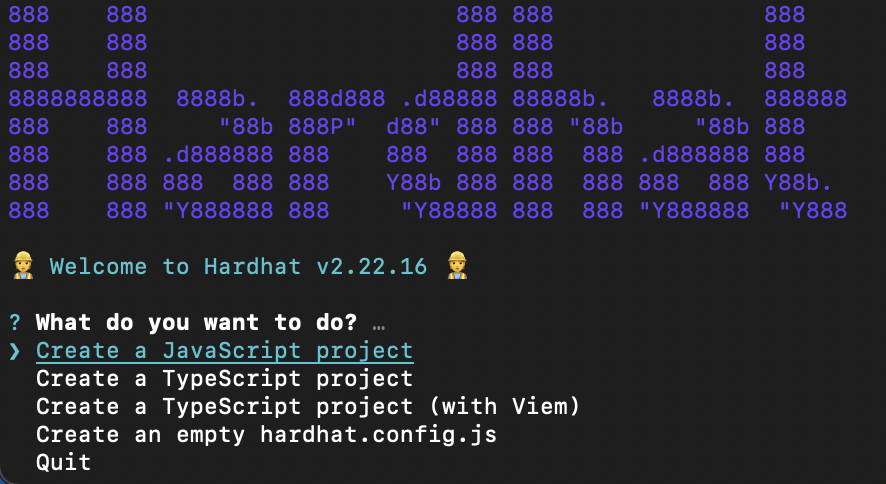
npx hardhat init
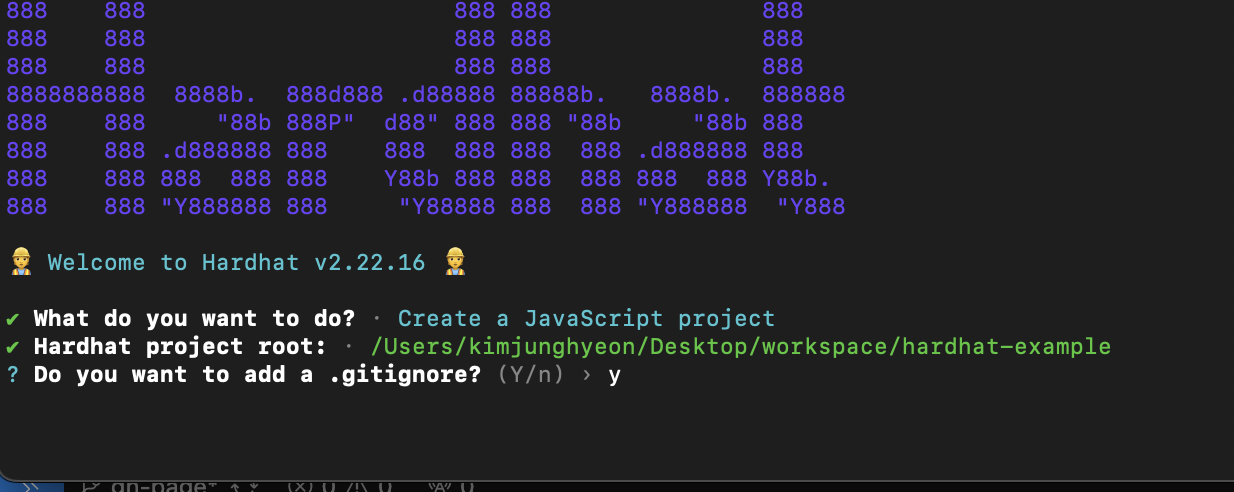
아래와 같은 선택 창이 뜹니다. 저는 TypeScript가 익숙치 않으니 JavaScript Project를 선택하겠습니다. 해당 위치에 커서를 두고 Enter를 눌러주세요
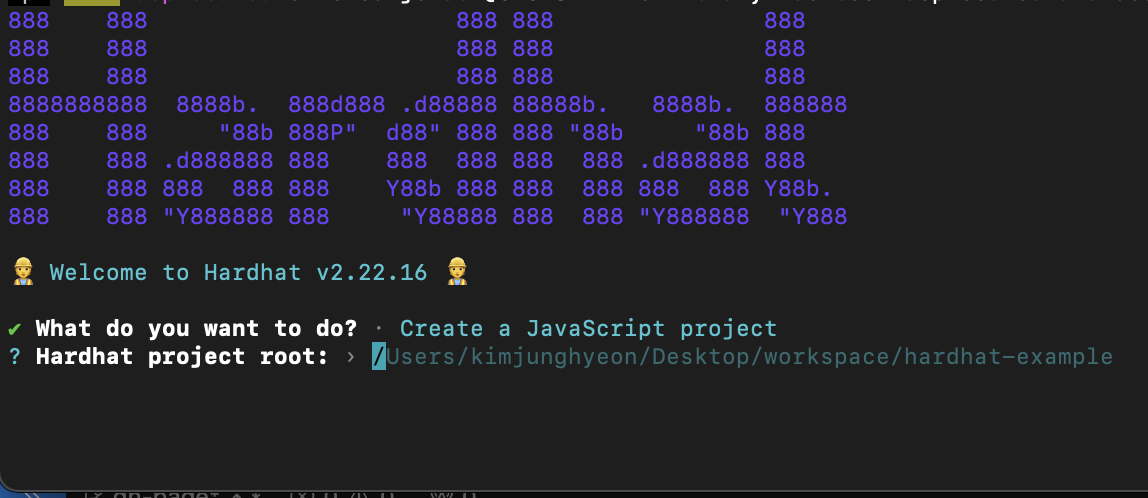
다음은 프로젝트 생성 경로를 지정해줍니다.
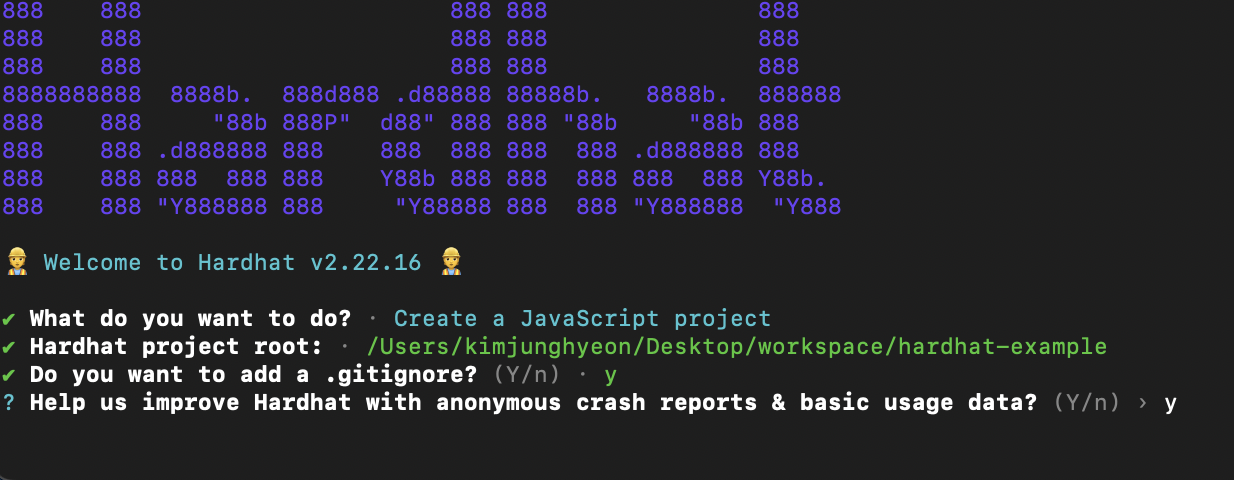
.gitignore 파일을 생성할지 물어봅니다. 저는 y로 하겠습니다.
오류 나면 익명으로 사용 데이터를 수집한다는데 마찬가지로 저는 y로 하겠습니다.
디렉토리 구조
위 과정을 완료하시면 Project root로 설정하신 디렉토리에 아래와 같이 초기 프로젝트 구성이 된 것을 확인하실 수 있습니다. 저는 visual Studio Code를 활용해 디렉토리를 연 상태입니다.
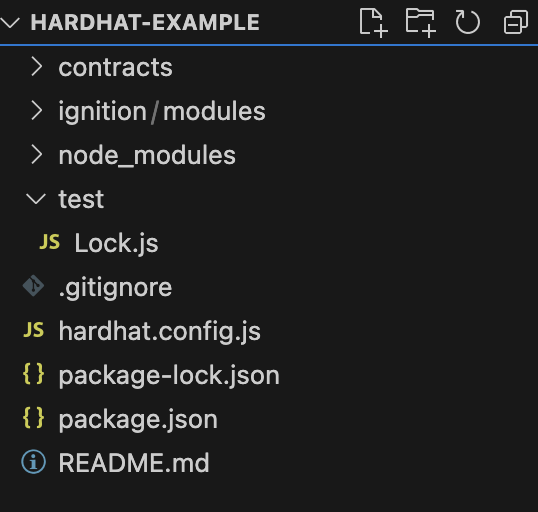
핵심 구성 요소
contracts/: 스마트 컨트랙트의 Solidity 소스 파일이 저장되는 기본 위치입니다.ignition/modules/: 스마트 컨트랙트 배포 시 모듈식 배포 스크립트가 위치하는 디렉토리입니다. 참고로iginition은 hardhat의 배포 관리 플러그인으로, 컨트랙트 배포를 더 체계적이고 반복 가능하게 관리할 수 있도록 도와주며 아래 구조와 같이 여러개의 모듈로 구성할 수 있습니다.
1
2
3
ignition/modules/
├── moduleA.js  # 배포 순서에 포함될 첫 번째 모듈
└── moduleB.js  # 두 번째 모듈
test/: JavaScript 또는 TypeScript를 활용하여 테스트 스크립트를 작성하여 위치시키는 디렉토리입니다.hardhat.config.js: Hardhat 환경 설정 파일로 네트워크, 컴파일러 옵션, 플러그인 등을 정의할 수있습니다.
예제 코드 확인하기
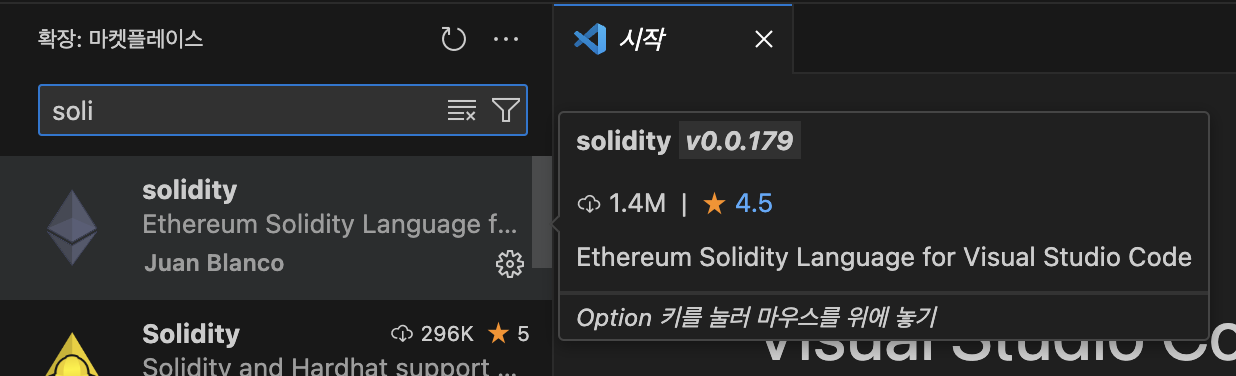
Tip. 시작하기 앞서 Solidity 파일을 편하게 보기 위해 아래와 같이 Extension을 설치해주세요!
contracts/Lock.sol
프로젝트 생성 후 자동으로 생성된 contracts/Lock.sol 파일을 확인해봅시다.
특정 시간 이후에만 소유자가 자금을 인출할 수 있도록 설계된 타임락(Time-Lock) 컨트랙트로 코드 설명은 주석을 통해서 작성하였습니다.
1
2
3
4
5
6
7
8
9
10
11
12
13
14
15
16
17
18
19
20
21
22
23
24
25
26
27
28
29
30
31
32
33
34
35
36
// SPDX-License-Identifier: UNLICENSED
pragma solidity ^0.8.27; // Solidity 컴파일러 버전을 지정합니다. (^0.8.27 이므로 해당 버전 이상을 사용해야 합니다.)

// Uncomment this line to use console.log
// import "hardhat/console.sol";

contract Lock {
    uint public unlockTime; // 잠금 해제 시간
    address payable public owner; // 컨트랙트 소유자 주소

    event Withdrawal(uint amount, uint when); // 이벤트: 출금 시 발생하며, 출금 금액(amount)와 시점(when)을 기록

		// 생성자(컨트랙트 배포 시 실행 됨): 입력 값으로 _unlockTiem(잠금 해제 시간)을 받습니다.
    constructor(uint _unlockTime) payable {
        require( // require(조건):
            block.timestamp < _unlockTime, // _unlockTiem이 현재시간(block.timestampe)보다 미래의 시간이여야 합니다.
            "Unlock time should be in the future"
        );

        unlockTime = _unlockTime; // unlockTime 저장
        owner = payable(msg.sender); // 컨트랙트 배포 주소(msg.sender)를 소유자로 설정하며 payable 키워드를 통해 컨트랙트 배포 시 이더를 받을 수 있도록 허용합니다.
    }

		// 출금 함수:
    function withdraw() public {
        // Uncomment this line, and the import of "hardhat/console.sol", to print a log in your terminal
        // console.log("Unlock time is %o and block timestamp is %o", unlockTime, block.timestamp);

        require(block.timestamp >= unlockTime, "You can't withdraw yet"); // 조건: 현재시간이 unlockTime 이상이어얗
        require(msg.sender == owner, "You aren't the owner"); // 호출자가 컨트랙트의 소유자(owner) 여야 함

        emit Withdrawal(address(this).balance, block.timestamp); // 이벤트 발생: 이벤트 호출을 통해 출금 금액과 시간을 기록

        owner.transfer(address(this).balance); // 컨트랙트 잔액을 소유자(owner)에게 전달
    }
}
ignition/modules/Lock.js
다음은 배포 스크립트를 확인해봅시다.
1
2
3
4
5
6
7
8
9
10
11
12
13
14
15
16
17
18
19
20
21
// This setup uses Hardhat Ignition to manage smart contract deployments.
// Learn more about it at https://hardhat.org/ignition

const { buildModule } = require("@nomicfoundation/hardhat-ignition/modules");

const JAN_1ST_2030 = 1893456000; // 기본 잠금해제 타임스탬프 2023년 1월 1일
const ONE_GWEI = 1_000_000_000n; // 1 Gwei 설정

module.exports = buildModule("LockModule", (m) => { // 모듈 이름 "LockModule" 로 설정
  // 파라미터 세팅
  const unlockTime = m.getParameter("unlockTime", JAN_1ST_2030);
  const lockedAmount = m.getParameter("lockedAmount", ONE_GWEI);

  // 스마트 컨트랙트 배포후 인스턴스 반환
  const lock = m.contract("Lock", [unlockTime], {
    value: lockedAmount,
  });

  return { lock };
});
const { buildModule } = require("@nomicfoundation/hardhat-ignition/modules");Iginition의 주요 함수로 배포 과정을 정의하는데 사용
test/Lock.js
test 코드는 길어서 하나씩 뜯어보겠습니다.
1
2
3
4
5
6
const {
  time,
  loadFixture,
} = require("@nomicfoundation/hardhat-toolbox/network-helpers");
const { anyValue } = require("@nomicfoundation/hardhat-chai-matchers/withArgs");
const { expect } = require("chai");
- 테스트에 필요한 의존성을 가져오는 부분입니다.
time: 시간관련 도구를 제공하며 특정 시점으로 네트워크 시간을 이동하여 테스트 가능하게 해줍니다.loadFixture: 테스트 고정값(Fixture)을 설정하여 각 테스트 실행 전 상태를 초기화합니다.anyValue: 이벤트 매처에서 특정 값 대신 “어떤 값이라도 허용” 하도록 지정합니다.expect: Chai의 기본 매처로, 테스트 결과를 검증합니다.
1
2
3
4
5
6
7
8
9
10
11
12
13
14
15
async function deployOneYearLockFixture() {
  const ONE_YEAR_IN_SECS = 365 * 24 * 60 * 60; // 1년을 초 단위로 표현
  const ONE_GWEI = 1_000_000_000; // 1 Gwei

  const lockedAmount = ONE_GWEI;
  const unlockTime = (await time.latest()) + ONE_YEAR_IN_SECS; // 현재 시간 + 1년

  // 기본으로 첫 번째 계정(owner)이 컨트랙트를 배포
  const [owner, otherAccount] = await ethers.getSigners();

  const Lock = await ethers.getContractFactory("Lock"); // Lock 컨트랙트 가져오기
  const lock = await Lock.deploy(unlockTime, { value: lockedAmount }); // 배포

  return { lock, unlockTime, lockedAmount, owner, otherAccount };
}
- 테스트 시 동일한 초기 상태(컨트랙트 배포 등)을 재사용 하기 위해 테스트 전 고정값을 지정합니다. 이를 통해 테스트 시 같은 초기 값을 갖고 있는 컨트랙트로 테스트할 수 있습니다.
1
2
3
4
5
6
7
8
9
10
11
12
13
14
15
16
17
18
19
20
21
22
23
24
25
26
27
28
29
30
describe("Deployment", function () {
  it("Should set the right unlockTime", async function () {
    const { lock, unlockTime } = await loadFixture(deployOneYearLockFixture);

    expect(await lock.unlockTime()).to.equal(unlockTime);
  });

  it("Should set the right owner", async function () {
    const { lock, owner } = await loadFixture(deployOneYearLockFixture);

    expect(await lock.owner()).to.equal(owner.address);
  });

  it("Should receive and store the funds to lock", async function () {
    const { lock, lockedAmount } = await loadFixture(deployOneYearLockFixture);

    expect(await ethers.provider.getBalance(lock.target)).to.equal(
      lockedAmount
    );
  });

  it("Should fail if the unlockTime is not in the future", async function () {
    const latestTime = await time.latest();
    const Lock = await ethers.getContractFactory("Lock");
    await expect(Lock.deploy(latestTime, { value: 1 })).to.be.revertedWith(
      "Unlock time should be in the future"
    );
  });
});
- 배포 테스트
- 배포된 컨트랙트의
unlockTime과owner가 올바르게 설정됐는지 검증합니다. - 컨트랙트 잠금 금액(
lockedAmount)를 정확히 보유하는지 검증합니다. - 과거 시점의
unlockTime으로 배포 시 실패 여부 확인합니다.
- 배포된 컨트랙트의
1
2
3
4
5
6
7
8
9
10
11
12
13
14
15
16
17
18
19
20
21
22
23
24
25
26
27
28
29
30
31
32
33
describe("Withdrawals", function () {
  describe("Validations", function () {
    it("Should revert with the right error if called too soon", async function () {
      const { lock } = await loadFixture(deployOneYearLockFixture);

      await expect(lock.withdraw()).to.be.revertedWith(
        "You can't withdraw yet"
      );
    });

    it("Should revert with the right error if called from another account", async function () {
      const { lock, unlockTime, otherAccount } = await loadFixture(
        deployOneYearLockFixture
      );

      await time.increaseTo(unlockTime);

      await expect(lock.connect(otherAccount).withdraw()).to.be.revertedWith(
        "You aren't the owner"
      );
    });

    it("Shouldn't fail if the unlockTime has arrived and the owner calls it", async function () {
      const { lock, unlockTime } = await loadFixture(
        deployOneYearLockFixture
      );

      await time.increaseTo(unlockTime);

      await expect(lock.withdraw()).not.to.be.reverted;
    });
  });
- 출금 테스트
- 잠금 해제 시간 전 출금 시 실패 여부 확인
- 소유자가 아닌 계정에서 출금 시 실패 여부 확인
- 잠금 해제 시간이 된 후 소유자가 출금할 때 성공 여부 확인
hardhat.config.js
1
2
3
4
5
6
7
require("@nomicfoundation/hardhat-toolbox");

/** @type import('hardhat/config').HardhatUserConfig */
module.exports = {
  solidity: "0.8.27", // Solidity 컴파일러 버전 지정
};
@nomicfoundation/hardhat-toolbox: Harahat 에서 자주 사용되는 기능과 플러그인을 하나의 패키지로 통합한 툴박스 패키지입니다.- 주요 포함 라이브러리
@nomiclabs/hardhat-ethers: Ethers.js와의 통합@nomiclabs/hardhat-waffle: Waffle 기반 스마트 컨트랙트 테스트 기능 제공hardhat-etherscan: Etherscan에 컨트랙트를 검증 및 업로드hardhat-gas-reporter: 가스 사용량 분석 및 보고서 생성
- 주요 포함 라이브러리
- 추가 적인 설정은 hardhat Docs 를 참고하세요!
컨트랙트 배포
compile
아래 명령어를 통해 스마트 컨트랙트를 컴파일 해줍시다.
1
npx hardhat compile
결과
1
2
3
➜  hardhat-example npx hardhat compile
Downloading compiler 0.8.27
Compiled 1 Solidity file successfully (evm target: paris).
test
배포 전 컨트랙트 코드 테스트를 위해 테스트 코드를 실행해 줍시다.
1
npx hardhat test
결과
1
2
3
4
5
6
7
8
9
10
11
12
13
14
15
16
17
18
19
20
21
➜  hardhat-example npx hardhat test


  Lock
    Deployment
      ✔ Should set the right unlockTime (617ms)
      ✔ Should set the right owner
      ✔ Should receive and store the funds to lock
      ✔ Should fail if the unlockTime is not in the future
    Withdrawals
      Validations
        ✔ Should revert with the right error if called too soon
        ✔ Should revert with the right error if called from another account
        ✔ Shouldn't fail if the unlockTime has arrived and the owner calls it
      Events
        ✔ Should emit an event on withdrawals
      Transfers
        ✔ Should transfer the funds to the owner


  9 passing (649ms)
deploy
배포 전 로컬 테스트를 위해 로컬 노드를 실행해 줍시다.
- 기본 127.0.0.1에 8545 port로 실행되지만 –hostname 과 – port를 지정하여 실행할 수 도 있습니다.
결과
20 개의 Account가 생성되며 각 10000 ETH 씩 주어집니다. 컨트랙트 배포 시 특정 Account를 지정하지 않으면 #01 account default 로 지정이 됩니다.
배포 명령어
1
npx hardhat ignition deploy ./ignition/modules/Lock.js --network localhost
- ignition module 파일과 network를 지정하여 배포해줍니다.
결과
1
2
3
4
5
6
7
8
9
10
11
12
13
➜  hardhat-example npx hardhat ignition deploy ./ignition/modules/Lock.js --network localhost
Hardhat Ignition 🚀

Deploying [ LockModule ]

Batch #1
  Executed LockModule#Lock

[ LockModule ] successfully deployed 🚀

Deployed Addresses

LockModule#Lock - 0x5FbDB2315678afecb367f032d93F642f64180aa
1
2
3
4
5
6
7
8
9
10
11
12
13
14
15
16
17
18
19
20
21
22
23
24
25
26
27
28
29
30
31
32
33
34
WARNING: These accounts, and their private keys, are publicly known.
Any funds sent to them on Mainnet or any other live network WILL BE LOST.

eth_chainId
hardhat_metadata
eth_accounts
hardhat_getAutomine
eth_chainId
eth_getBlockByNumber
eth_getTransactionCount (3)
eth_getBlockByNumber
eth_getTransactionCount
eth_getBlockByNumber
eth_chainId
eth_maxPriorityFeePerGas
eth_estimateGas
eth_call
  Contract deployment: Lock
  Contract address:    0x5fbdb2315678afecb367f032d93f642f64180aa3
  From:                0xf39fd6e51aad88f6f4ce6ab8827279cfffb92266
  Value:               1. gwei

eth_sendTransaction
  Contract deployment: Lock
  Contract address:    0x5fbdb2315678afecb367f032d93f642f64180aa3
  Transaction:         0xc5939a2e5819250c146a878b3b1bbe38682b205c84ece6379bdeab27e7b655ef
  From:                0xf39fd6e51aad88f6f4ce6ab8827279cfffb92266
  Value:               1. gwei
  Gas used:            326100 of 326100
  Block #1:            0x86d2ff4f2ae5af50780068ce0f3352b4740cf9e0e0e8bdab92df4c2dfddabf25

eth_getTransactionByHash
eth_getBlockByNumber
eth_getTransactionReceipt
마치며
이번 포스팅에서는 Hardhat을 활용해 스마트 컨트랙트를 컴파일, 테스트, 배포하는 과정을 살펴보았습니다. 다음 포스팅에서는 스마트 컨트랙트를 직접 구현하는 방법을 다룰 예정입니다.
읽어주셔서 감사합니다!