[MSA] Spring Cloud Gateway
지난 포스팅에서는 Eureka를 활용한 서비스 디스커버리(Service Discovery)에 대해 알아보았습니다. 이번 글에서는 Spring Cloud Gateway를 사용해, 서비스 디스커버리에 등록된 각 마이크로서비스 간의 연결을 관리하고 라우팅을 수행하는 방법을 알아보고, 실제 구현해보겠습니다.
Spring Cloud Gateway란?
Spring Cloud Gateway는 클라우드 환경에서 마이크로서비스를 효율적으로 관리하는 API Gateway 솔루션입니다. 이를 통해 클라이언트 요청을 받아 각 마이크로서비스로 연결하고, 요청 전,후에 다양한 필터 로직을 적용할 수 있습니다. Spring Cloud Gateway는 Reactive Server와 MVC 방식을 모두 지원하며, 이번 포스팅에서는 Reactive Server 방식을 중심으로 설명하겠습니다.
Sprign Cloud Gateway 핵심 용어
- Route: 클라이언트 요청을 특정 서비스로 전달하는 경로 설정입니다. 각 라우트는 ID, 목적지 URI, 그리고 요청을 전달할 조건인 Predictae와 Filter로 구성됩니다. Route를 통해 Gateway가 요청을 어느 서비스로 라우팅할지 정의할 수 있습니다.
- Predicate: 요청을 특정 Route로 매칭시키는 조건입니다. HTTP 요청의 경로나 헤더, 메소드 등의 속성에 따라 요청이 해당 Route에 매칭되는지 확인합니다. 예를 들어, 특정 URL 경로나 HTTP 메소드(GET, POST 등) 에 기반해 라우트를 지정할 수 있습니다.
- Filter: 요청 전후에 수행할 다양한 부가 작업을 정의합니다. 요청을 특정 마이크로서비스로 라우팅하기 전에 인증, 로깅, 수정 등의 처리를 수행하거나, 응답을 가곡하는 데 사용할 수 있습니다. 필터는 사전(Pre)필터와 사후(Post)필터로 나뉘며, 요청의 흐름에서 다양한 부가 작업을 지원합니다.
작동 원리 및 주요 기능
작동 원리
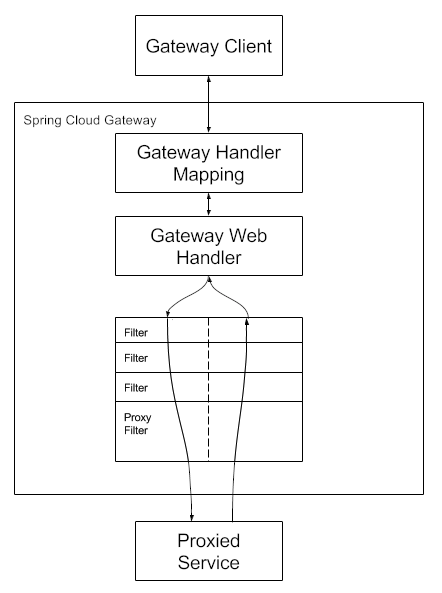
- 클라이언트가 Spring Cloude Gateway로 요청을 보내면, Gateway Handler Mapping이 경로를 확인해 요청과 일치하는지 판단합니다. 경로가 일치하면 요청이 Gateway Web Handler로 전달되며, 이 핸들러는 요청에 대해 필터 체인을 통해 작업을 수행합니다. 필터는 프록시 요청이 전달되기 전과 후 모두에서 로직을 실행할 수 있어 그림에서 점선 기준으로 “사전” 필터와 “사후” 필터로 나뉩니다. 먼저 모든 사전 필터 수행 후 Proxied Service에서 요청이 수행되고 응답 후에 사후 팔터를 통해 로직이 실행됩니다.
주요 기능
- 라우팅: HTTP 요청을 적절한 마이크로서비스로 라우팅
- 필터링: 인증, 로깅, 요청, 수정 등의 작업을 필터를 통해 구현
- 로드 밸런싱: 여러 인스턴스 간 트래픽 분산
- 보안: 인증 및 권한 부여 기능 제공
- 모니터링 및 추적: 마이크로서비스 간 요청 추적 및 모니터링
predicate 설정
predicate 란
요청을 특정 Route로 매칭시키는 조건입니다. HTTP 요청의 경로나 헤더, 메소드 등의 속성에 따라 요청이 해당 Route에 매칭되는지 확인합니다. 예를 들어, 특정 URL 경로나 HTTP 메소드(GET, POST 등) 에 기반해 라우트를 지정할 수 있습니다.
predicate 구성
predicate 구성은 application.yaml 에 구성하는 방식중 2가지 방식이 있습니다.
- key, value를
=로 구성, value 는,로 구분
1
2
3
4
5
6
7
8
spring:
  cloud:
    gateway:
      routes:
      - id: after_route
        uri: https://example.org
        predicates:
        - Cookie=mycookie,mycookievalue
name,args로 구성
1
2
3
4
5
6
7
8
9
10
11
spring:
  cloud:
    gateway:
      routes:
      - id: after_route
        uri: https://example.org
        predicates:
        - name: Cookie
          args:
            name: mycookie
            regexp: mycookievalue
다양한 predicate
요청 Route와 매핑 시키기 위한 다양한 방식이 존재합니다. 특정 시간 이후에는 해당 Route로 매핑시키거나 특정 쿠키가 존재할 경우, host 경로 , Path 일치 등 다양한 방식이 존재하며 이번 포스팅에서는 Path를 통한 조건을 확인해보겠습니다. 다양한 조건은 SpringCloudGateway Reference Docs 를 참고하세요
1
2
3
4
5
6
7
8
9
spring:
  application:
    name: apigateway-service
  cloud:
      routes:
        - id: user-service
          uri: lb://USER-SERVICE
          predicates:
            - Path=/user-service/**
Path= /user-service/로 들어오면 Eureka Server에 USER-SERVICE로 보내라는 설정입니다.
Filter 설정
Filter란?
요청 전후에 수행할 다양한 부가 작업을 정의합니다. 요청을 특정 마이크로서비스로 라우팅하기 전에 인증, 로깅, 수정 등의 처리를 수행하거나, 응답을 가곡하는 데 사용할 수 있습니다. 필터는 사전(Pre)필터와 사후(Post)필터로 나뉘며, 요청의 흐름에서 다양한 부가 작업을 지원합니다.
Filter 구성
yaml 파일에서 간단하게 Filter 추가가 가능합니다. Spring Cloud Gateway에서 정의해둔
AddRequestHeader등과 같은 필터를 사용해 간단하게 추가할 수도 있고, CustomFilter 로직을 java로 구현한후 해당 클래스 명을 yaml에 명시해 등록할 수도 있습니다.더 자세한 내용은 Spring Cloud Gateway Reference Docs 를 참고하세요
- Yaml 로 등록
AddRequestHeader를 통해 requestHeader에 특정 값을 추가시킵니다.
1
2
3
4
5
6
7
8
spring:
  cloud:
    gateway:
      routes:
      - id: add_request_header_route
        uri: https://example.org
        filters:
        - AddRequestHeader=X-Request-red, blue
- CustomFilter 등록
1
2
3
4
5
6
7
8
9
10
11
12
13
14
15
16
17
18
19
20
21
22
23
24
25
26
27
28
29
30
31
32
33
34
35
36
37
package com.example.apigatewayservice.filter;

import lombok.extern.slf4j.Slf4j;
import org.springframework.cloud.gateway.filter.GatewayFilter;
import org.springframework.cloud.gateway.filter.factory.AbstractGatewayFilterFactory;
import org.springframework.http.server.reactive.ServerHttpRequest;
import org.springframework.http.server.reactive.ServerHttpResponse;
import org.springframework.stereotype.Component;
import reactor.core.publisher.Mono;

@Slf4j
@Component
public class CustomFilter extends AbstractGatewayFilterFactory<CustomFilter.Config> {

    public CustomFilter() {
        super(Config.class);  // Config 클래스를 지정하여 필터를 초기화
    }

    @Override
    public GatewayFilter apply(Config config) {
        return (exchange, chain) -> {
            ServerHttpRequest request = exchange.getRequest();
            ServerHttpResponse response = exchange.getResponse();

            log.info("Custom PRE filter: request id -> {}", request.getId());

            return chain.filter(exchange)
                    .then(Mono.fromRunnable(() -> {
                        log.info("Custom POST filter: response code -> {}", response.getStatusCode());
                    }));
        };
    }

    public static class Config {
    }
}
1
2
3
4
5
6
7
8
9
10
11
12
13
14
15
spring:
  application:
    name: apigateway-service
  cloud:
      routes:
        - id: user-service
          uri: lb://USER-SERVICE
          predicates:
            - Path=/user-service/**
        - id: first-service
          uri: lb://FIRST-SERVICE
          predicates:
            - Path=/first-service/**
          filters:
            - CustomFilter
Globa Filter 등록
- 각 서비스들에 대해서 Filter를 등록할 수 있지만 인증, 인가 처리 등 공통 로직에 대한 Global Filter를 정의할 수 있습니다.
1
2
3
4
5
6
7
8
9
10
11
12
13
14
15
16
17
18
19
20
21
22
23
24
25
26
27
28
29
30
31
32
33
34
35
36
37
38
39
40
41
42
43
44
45
46
package com.example.apigatewayservice.filter;

import lombok.Data;
import lombok.extern.slf4j.Slf4j;
import org.springframework.cloud.gateway.filter.GatewayFilter;
import org.springframework.cloud.gateway.filter.factory.AbstractGatewayFilterFactory;
import org.springframework.http.server.reactive.ServerHttpRequest;
import org.springframework.http.server.reactive.ServerHttpResponse;
import org.springframework.stereotype.Component;
import reactor.core.publisher.Mono;

@Slf4j
@Component
public class GlobalFilter extends AbstractGatewayFilterFactory<GlobalFilter.Config> {

    public GlobalFilter() {
        super(Config.class);  // Config 클래스를 지정하여 필터를 초기화
    }

    @Override
    public GatewayFilter apply(Config config) {
        return (exchange, chain) -> {
            ServerHttpRequest request = exchange.getRequest();
            ServerHttpResponse response = exchange.getResponse();

            log.info("Global filter baseMessage -> {}", config.getBaseMessage());

            if (config.isPreLogger())
                log.info("Global Filter Start: request id -> {}", request.getId());

            return chain.filter(exchange)
                    .then(Mono.fromRunnable(() -> {
                        if (config.isPreLogger())
                            log.info("Global Filter End: responseCode -> {}", response.getStatusCode());
                    }));
        };
    }

    @Data
    public static class Config {
        private String baseMessage;
        private boolean preLogger;
        private boolean postLogger;
    }
}
1
2
3
4
5
6
7
8
9
10
11
spring:
  application:
    name: apigateway-service
  cloud:
    gateway:
      default-filters:
        - name: GlobalFilter
          args:
            baseMessage: Global Filter Base Message
            preLogger: true
            postLogger: true
구현
준비사항
- Gateway를 실행시키기 위해서는 아래 항목들 준비가 필요합니다. 제 Github 에 해당 항목들 준비되어있으니 확인해보세용
- 추가로 gateway에 연결시킬 sample Microservice인 FirstService와 SecondService 프로젝트를 준비해두었습니다.
- Eureka Server
- FirstService (Sample MicroService)
- SecondService (Sample MicroService)
project 생성
- Java 17
- Spring Boot 3.3.4
- Spring Gateway
- Spring Cloud Netflix Eureka Client
build.gradle
1
2
3
4
5
6
7
8
9
10
11
12
13
14
15
16
17
18
19
20
21
22
23
24
25
26
27
28
29
30
31
32
33
34
35
36
37
38
39
40
41
42
43
44
45
46
47
48
plugins {
    id 'java'
    id 'org.springframework.boot' version '3.3.4'
    id 'io.spring.dependency-management' version '1.1.6'
}

group = 'com.example'
version = '0.0.1-SNAPSHOT'

java {
    toolchain {
        languageVersion = JavaLanguageVersion.of(17)
    }
}

configurations {
    compileOnly {
        extendsFrom annotationProcessor
    }
}

repositories {
    mavenCentral()
}

ext {
    set('springCloudVersion', "2023.0.3")
}

dependencies {
    implementation 'org.springframework.cloud:spring-cloud-starter-gateway'
    implementation 'org.springframework.cloud:spring-cloud-starter-netflix-eureka-client'
    compileOnly 'org.projectlombok:lombok'
    annotationProcessor 'org.projectlombok:lombok'
    testImplementation 'org.springframework.boot:spring-boot-starter-test'
    testRuntimeOnly 'org.junit.platform:junit-platform-launcher'
}

dependencyManagement {
    imports {
        mavenBom "org.springframework.cloud:spring-cloud-dependencies:${springCloudVersion}"
    }
}

tasks.named('test') {
    useJUnitPlatform()
}
application.yml
1
2
3
4
5
6
7
8
9
10
11
12
server:
  port: 8000
eureka:
  client:
    fetch-registry: true
    register-with-eureka: true
    service-url:
      defaultZone: http://localhost:8761/eureka

spring:
  application:
    name: apigateway-service
server.port: service port 를 8000으로 세팅eureka.client.fetch-registry: 다른 서비스들의 정보를 현재 서비스 인스턴스가 Eureka 서버로부터 가져올지 여부를 지정eureka.client.register.with-eureka: 현재 애플리케이션을 Eureka 서버에 등록할지 여부를 지정eureka.client.service-url.defaultZone: Eureka 서버 url 지정
Routes 등록
1
2
3
4
5
6
7
8
9
10
11
12
13
spring:
  application:
    name: apigateway-service
  cloud:
      routes:
        - id: first-service
          uri: lb://FIRST-SERVICE
          predicates:
            - Path=/first-service/**
        - id: second-service
          uri: lb://SECOND-SERVICE
          predicates:
            - Path=/second-service/**
id:
- 설명: 각 라우트를 식별하는 고유 ID입니다.
- 예시:
user-service,first-service,second-service
uri:
- 설명: 요청을 전달할 대상 서비스의 URI를 지정합니다.
- 값:
lb://<SERVICE-NAME>형식으로 설정되며,lb는 로드 밸런서를 의미합니다.USER-SERVICE,FIRST-SERVICE,SECOND-SERVICE는 각 대상 서비스의 이름입니다. - 동작: Eureka와 같은 서비스 디스커버리에서 서비스 인스턴스의 위치를 동적으로 조회하여 로드 밸런싱을 통해 라우팅합니다.
predicates:
- 설명: 요청이 라우트에 매칭되는 조건을 지정합니다.
- 예시:
Path=/user-service/**는/user-service/로 시작하는 모든 요청이user-service로 라우팅됨을 의미합니다. - 용도: 각 서비스별로 특정 경로 패턴을 정의하여, 해당 경로로 들어온 요청을 해당 서비스로 연결합니다.
### Global Filter 등록
1
2
3
4
5
6
7
8
9
10
11
12
13
14
15
16
17
18
19
20
21
22
23
24
25
26
27
28
29
30
31
32
33
34
35
36
37
38
39
40
41
42
43
44
45
46
package com.example.apigatewayservice.filter;

import lombok.Data;
import lombok.extern.slf4j.Slf4j;
import org.springframework.cloud.gateway.filter.GatewayFilter;
import org.springframework.cloud.gateway.filter.factory.AbstractGatewayFilterFactory;
import org.springframework.http.server.reactive.ServerHttpRequest;
import org.springframework.http.server.reactive.ServerHttpResponse;
import org.springframework.stereotype.Component;
import reactor.core.publisher.Mono;

@Slf4j
@Component
public class GlobalFilter extends AbstractGatewayFilterFactory<GlobalFilter.Config> {

    public GlobalFilter() {
        super(Config.class);  // Config 클래스를 지정하여 필터를 초기화
    }

    @Override
    public GatewayFilter apply(Config config) {
        return (exchange, chain) -> {
            ServerHttpRequest request = exchange.getRequest();
            ServerHttpResponse response = exchange.getResponse();

            log.info("Global filter baseMessage -> {}", config.getBaseMessage());

            if (config.isPreLogger())
                log.info("Global Filter Start: request id -> {}", request.getId());

            return chain.filter(exchange)
                    .then(Mono.fromRunnable(() -> {
                        if (config.isPreLogger())
                            log.info("Global Filter End: responseCode -> {}", response.getStatusCode());
                    }));
        };
    }

    @Data
    public static class Config {
        private String baseMessage;
        private boolean preLogger;
        private boolean postLogger;
    }
}
1
2
3
4
5
6
7
8
9
10
11
spring:
  application:
    name: apigateway-service
  cloud:
    gateway:
      default-filters:
        - name: GlobalFilter
          args:
            baseMessage: Global Filter Base Message
            preLogger: true
            postLogger: true
CustomFilter 등록
1
2
3
4
5
6
7
8
9
10
11
12
13
14
15
16
17
18
19
20
21
22
23
24
25
26
27
28
29
30
31
32
33
34
35
36
37
package com.example.apigatewayservice.filter;

import lombok.extern.slf4j.Slf4j;
import org.springframework.cloud.gateway.filter.GatewayFilter;
import org.springframework.cloud.gateway.filter.factory.AbstractGatewayFilterFactory;
import org.springframework.http.server.reactive.ServerHttpRequest;
import org.springframework.http.server.reactive.ServerHttpResponse;
import org.springframework.stereotype.Component;
import reactor.core.publisher.Mono;

@Slf4j
@Component
public class CustomFilter extends AbstractGatewayFilterFactory<CustomFilter.Config> {

    public CustomFilter() {
        super(Config.class);  // Config 클래스를 지정하여 필터를 초기화
    }

    @Override
    public GatewayFilter apply(Config config) {
        return (exchange, chain) -> {
            ServerHttpRequest request = exchange.getRequest();
            ServerHttpResponse response = exchange.getResponse();

            log.info("Custom PRE filter: request id -> {}", request.getId());

            return chain.filter(exchange)
                    .then(Mono.fromRunnable(() -> {
                        log.info("Custom POST filter: response code -> {}", response.getStatusCode());
                    }));
        };
    }

    public static class Config {
    }
}
1
2
3
4
5
6
7
8
9
10
11
12
13
14
15
16
17
18
19
20
21
22
23
spring:
  application:
    name: apigateway-service
  cloud:
    gateway:
      default-filters:
        - name: GlobalFilter
          args:
            baseMessage: Global Filter Base Message
            preLogger: true
            postLogger: true
      routes:
          predicates:
            - Path=/first-service/**
          filters:
            #            - AddRequestHeader=first-request, first-request-header2
            - CustomFilter
        - id: second-service
          uri: lb://SECOND-SERVICE
          predicates:
            - Path=/second-service/**
          filters:
            - name: CustomFilter
마치며
Spring cloud gateway에 대해 알아보고 routes를 위한 predicate 설정 및 공통 filter와 custom filter들을 직접 설정해보았습니다. 이처럼 Spring Cloud Gateway는 마이크로서비스 아키텍처에서 필수적인 역할을 하는 API Gateway 솔루션입니다. 이를 잘 활용하면 마이크로서비스 환경에서의 복잡성을 줄이고 요청 흐름을 체계적으로 관리할 수 있습니다.
- 전체 코드: GitHub
- 참고
- https://docs.spring.io/spring-cloud-gateway/reference/index.html
- https://www.inflearn.com/course/%EC%8A%A4%ED%94%84%EB%A7%81-%ED%81%B4%EB%9D%BC%EC%9A%B0%EB%93%9C-%EB%A7%88%EC%9D%B4%ED%81%AC%EB%A1%9C%EC%84%9C%EB%B9%84%EC%8A%A4/dashboard